

News
HOW TO USE WSOP PLUS AT WSOP EUROPE 2026

Las Vegas, Nevada (February 20, 2026) - Over the past few years, the World Series of Poker has undergone major changes, strengthening the WSOP brand and providing improved experiences for players.
Whether it be the creation of WSOP Paradise or moving WSOP Europe to Prague, the WSOP continues to build off past success while continuing to reach for new heights in the future.
One of the biggest additions to WSOP events over the past year has been the implementation of the WSOP+ app, a one-stop shop for poker players that has everything they need to make the most of their WSOP experience.
Drastically limiting time spent in line, providing the ability to register for events from their phone, and keeping up with the action through the Stories feed are just a few of the many substantial improvements WSOP+ has had on WSOP events.
Featured at the annual event for the first-time ever, WSOP+ will play a big role in WSOP Europe 2026, bringing all of its tools that have been utilized by players at the WSOP, WSOP Paradise, and WSOP Circuit events around the world.
As poker players get set for WSOP Europe 2026, be sure to read this complete guide detailing everything poker players need to know about using WSOP+ in Prague.
How to download WSOP+
Like most mobile apps, downloading WSOP+ requires poker players to have a smartphone with access to either the Apple App Store or Google Play, and it is free to download regardless of your device.
Using their phone, players can download WSOP+ through either the Apple App Store or Google Play through the links provided below:
DOWNLOAD WSOP+ THROUGH THE APPLE APP STORE
DOWNLOAD WSOP+ THROUGH GOOGLE PLAY
How to create a profile on WSOP+
Once you download WSOP+, you will need to create a profile within the app before you can begin the process of registering for WSOP events.
To create a player profile, open up the app and select “Sign Up” on the login screen.
From there, create a GGPass ID by providing an email address and your desired password, and accepting the Terms and Conditions and Privacy Policy once you review them.
Players can also elect to sign into WSOP+ through their existing Google, Apple, or Facebook accounts.
Completing the required in-person verification
After downloading WSOP+ and creating your player profile, there are still additional steps that need to be completed before you can register for events at WSOP Europe.
In order to sign up for events, players must complete in-person verification onsite at WSOP Europe.
Even if players have completed in-person verification at another WSOP event, they will still need to complete the verification process onsite at WSOP Europe.
To complete your in-person verification, arrive at the WSOP Europe tournament area with proper identification and follow the signage to the WSOP+ booth.
Once at the WSOP+ booth, wait for an available WSOP representative, and have them assist you in completing your in-person verification.
After completing your in-person verification, you are one step closer to taking part in the action at WSOP Europe 2026.
Be sure to swipe your card and sign in every day in Prague
Before you can register and participate in bracelet events at WSOP Europe, every player must receive a "sign-in" card at King's Casino within Hilton Prague.
Once you have your card, every player must swipe in when entering King's Casino every day they plan on playing before they can take part in WSOP Europe tournaments.
Adding funds to your WSOP+ account
Leveraging modern financial tools and currencies popular amongst poker players, WSOP+ provides a wide variety of convenient options for poker players to add funds towards registering for WSOP Europe events.
Poker players can use the following deposit options to add funds to their WSOP+ accounts:
-
Cash and/or casino chips at the cage or cashier
-
PayPal
-
ACH
-
Bank Wire
-
LuxonPay
-
Cryptocurrency
When making deposits to their WSOP+ account, players are encouraged to visit the WSOP+ booth at WSOP Europe, especially when completing their first deposit.
Players who intend to complete a bank wire transfer to add funds to their WSOP+ account for WSOP Europe must wire them directly to King’s Casino Prague.
Before completing a wire transfer, players are encouraged to review details on the King’s Casino website and email kasa@kings-resort.com if they require additional assistance.
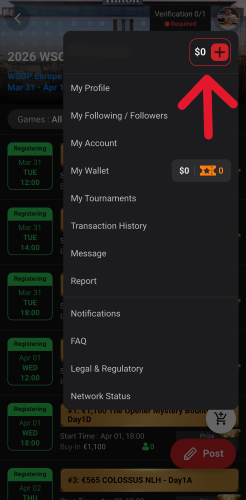
When you add funds to your WSOP+ account in Prague, the funds will not go to a general balance, but instead will be added to your WSOP Europe Tournament Account (TA) within the app.
The only difference between a general balance and your WSOP Europe TA is that the currency in your WSOP Europe TA can only be used to buy into WSOP Europe events, but don’t worry, your money will still be available for withdrawal at the property, whether it be in cash or through an approved withdrawal method.
Withdrawing funds from WSOP+
After you win a WSOP bracelet or reach the final table, eventually you will want to withdraw your winnings from WSOP+.
Players can withdraw their WSOP Europe winnings through the same methods they used to deposit (other than cryptocurrency). When making a withdrawal, players are encouraged to visit the WSOP+ booth at WSOP Europe, especially when executing their first deposit.
How to register for WSOP Europe events
To sign up for a WSOP Europe event, go to the general schedule page in WSOP+, and select 2026 WSOP Europe. After the first step, the complete schedule for bracelet and side events will appear on your phone screen.
Find the event or flight you wish to register for, select it, and the general page for the specific flight or event will pop up.
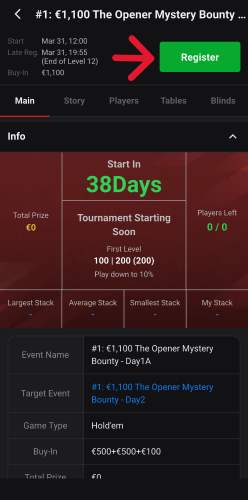
Once you’re on the general page for your desired event or flight, click the green Register button on the top right of your screen.
After selecting the Register button, a page will appear detailing important information for the tournament, and the complete breakdown of your buy-in total and how much money goes towards the prize pool, tournament fees, bounties, and more.
From there, tap the green Purchase Ticket button at the bottom of your screen, select WSOPE TA for your payment method, and complete the transaction.
At this point, you will have successfully registered for your WSOP Europe event!
For players wanting to buy into multiple events at once, there is also the option to add select tickets to your cart. To do this, simply select Add Ticket to Cart instead of Purchase Ticket within the Ticket Purchase page.
Use WSOP+ to find your table and seat assignment
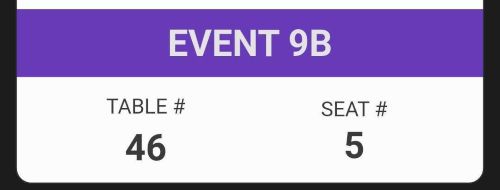
If the event you have registered for in WSOP+ is already underway, your table and seat assignment will become available within the event page specific to that event.
Simply tap the event you have registered for, and your seat and table assignment will appear along with all of the information relevant to the tournament.
If you buy into a WSOP Europe event that has yet to begin, your table and seat assignment will still be available, or will become available prior to the start of the event.
On the tournament floor and still struggling to find your seat? In that case, simply find a tournament staff member, show them your seating assignment on WSOP+, and they can assist you in finding your seat.
Useful WSOP+ features you want to use at WSOP Europe
WSOP+ is way more than just the app you use to register for events at WSOP Europe.
Being a one-stop shop means not only being able to register for events from your phone, but also accessing key information for the tournaments you play, the ability to document your WSOP Europe journey, and more!
Access key tournament information
Separation is in the preparation. Whether or not your WSOP Europe event has started, you can access critical tournament information in the WSOP+.
Access blind structures, break times, prize pools, and even information on other players by selecting your specific event on the 2026 WSOP Europe page in WSOP+.
Follow chip stacks in real time on WSOP+
For players with friends and family wanting to keep up on their deep run, they can check chip leaders and all chip stacks currently in play on WSOP+.
To see all of the chip stacks in players currently participating in a WSOP Europe event, select the specific tournament on the 2026 WSOP Europe page in WSOP+, then select the Players tab.
Document your journey on WSOP+ Stories
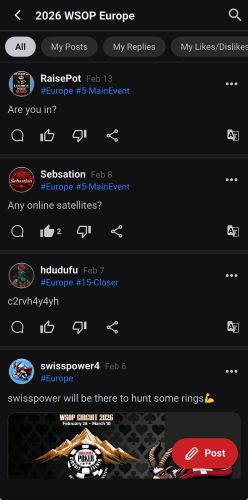
One of the most exciting features of WSOP+ is the Stories feature and feed.
Much like a social media feed, players competing at WSOP Europe 2026 can post updates, images, and even memes from the poker table while competing.
See your friend making a truly intimidating poker face? If so, you can snap a picture and tag them in the post to the WSOP Europe Stories feed.
Along with player posts, WSOP Live Reporters will also be on the tournament floor in Prague, posting live updates on all of the action that will be viewable on the WSOP Europe Stories feed.
To post to the Stories and view the feed at WSOP Europe, go to the 2026 WSOP Europe page within WSOP+, and tap the red Stories button at the top right of your screen.
